 JiBrok Studio for Jira Cloud
- Overview
- Configure execution identity
- Enable and disable trigger types
- Track script usage
- Manage UI modifications
- Security and permissions
- Administration sub-pages
- Next steps
Overview
All administrative settings are in the Admin tab, accessible to Jira site administrators only. This page covers execution identity, trigger controls, and security permissions. For other admin features, see the sub-pages below.
Health check
Database maintenance and integrity tools (migrations, duplicate detection, storage usage, data integrity). See Admin Tools - Health Check for details.
Diagnostic logging
Time-limited diagnostic logging for troubleshooting trigger and script execution issues:
- When enabled, detailed info-level logs are written for all trigger invocations
- Logs include: trigger invocations, script start/complete events, timing, skip reasons
- No sensitive data is logged (source code, issue data, PII are excluded)
- Duration options: 5 minutes to 14 days - auto-disables after the chosen duration
- Diagnostic logs are written to the Forge runtime log. Contact the app vendor if you need access to raw logs
Configure execution identity
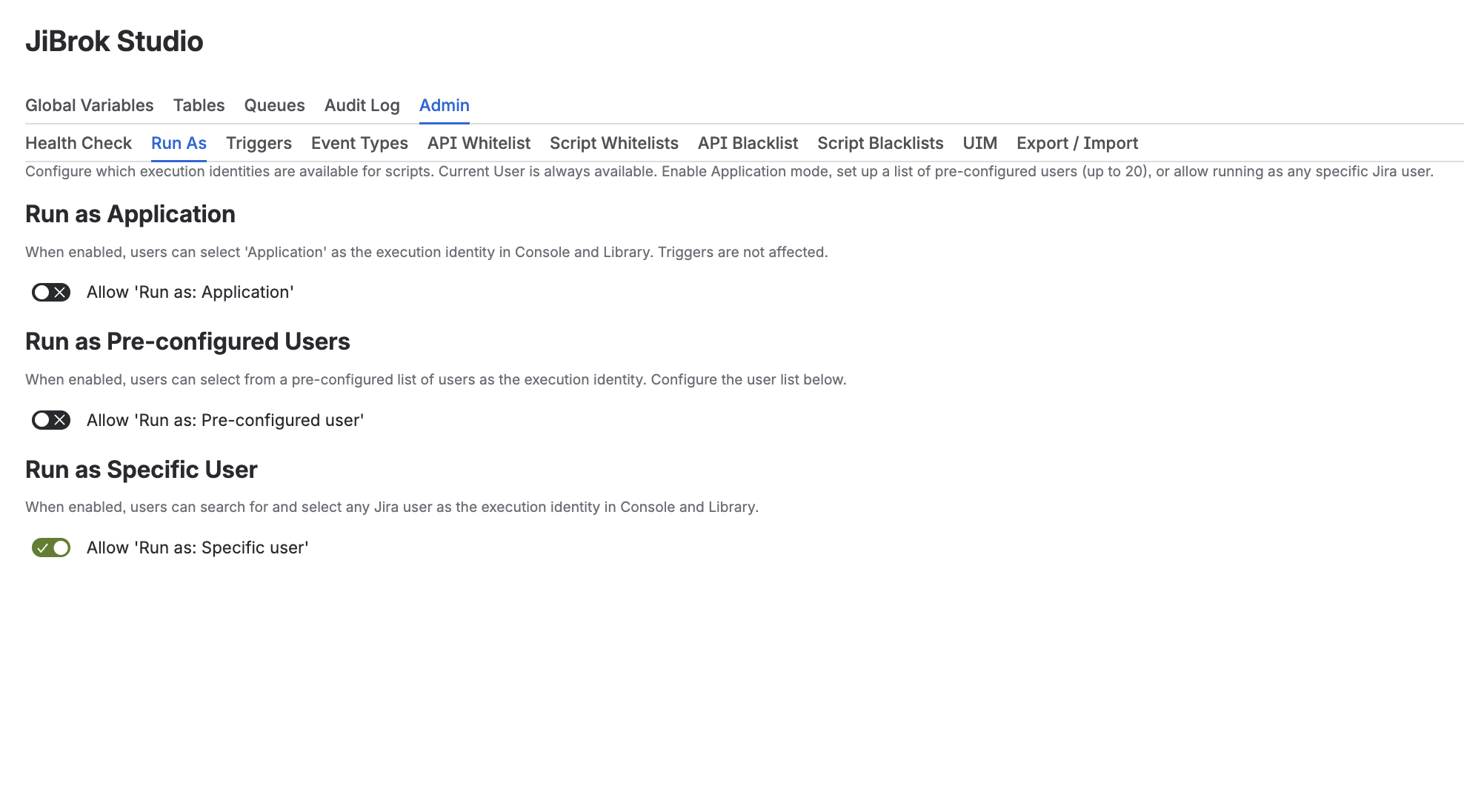
Controls which execution identities are available to scripts.
| Mode | Description | Default |
|---|---|---|
| Current User | Scripts run with the triggering user’s permissions | Always available |
| Application | Scripts run with app-level permissions (Forge impersonation) | Off |
| Pre-configured Users | Admin-defined user list for script execution | Off |
| Specific User | Search for any Jira user to run as | Off |
Pre-configured users
When enabled, admins can create a list of users with optional descriptions. Script authors select from this dropdown in the Console or Config tab.
What “Run As Application” means
When a script runs as Application, it uses the Forge app’s own permissions (with impersonation). This gives broader access than any individual user and is independent of who triggered the script. Use this for automated tasks that need system-level access.
Note: If a mode is disabled after scripts are configured to use it, a warning is shown but existing configurations are preserved.
Enable and disable trigger types
Toggle each trigger type on/off globally:
| Trigger Type | Description |
|---|---|
| Scheduled | Recurring timer triggers |
| Event | Jira event triggers |
| Async Event | Async event triggers |
| UIM | UI Modification triggers |
| Scripted Fields | Custom field computation |
| Automation | Jira Automation action triggers |
| Rovo | Rovo AI Agent script access |
| Workflow Post Function | Workflow transition post functions |
| Workflow Validator | Workflow transition validators |
| Workflow Condition | Workflow transition conditions (Jira Expressions) |
| Webtrigger | Webhook HTTP triggers |
Disabled types preserve existing configurations but prevent execution. All toggles are recorded in the audit log.
Event type settings
Fine-grained control over which Jira event types trigger scripts. Only applies to scripts with Event triggers.
- 32 event types available (issue_created, issue_updated, etc.)
- 7 core events enabled by default:
issue_created,issue_updated,issue_deleted,issue_assigned,comment_created,comment_deleted,comment_mentioned - Disable specific event types to reduce unnecessary script executions
- Changes are recorded in the audit log
Audit trigger type settings
Control which trigger types are logged in the Script Runs Audit:
| Trigger Type | Default | Description |
|---|---|---|
| Manual | Enabled | Console executions |
| Scheduled | Enabled | Scheduled trigger runs |
| Event | Enabled | Event trigger runs |
| UIM | Enabled | UIM trigger runs |
| Scripted Fields | Disabled | Custom field computations (high volume) |
| Async Event | Enabled | Async event runs |
| Automation | Enabled | Automation action runs |
| Rovo | Enabled | Rovo action runs |
| Workflow Post Function | Enabled | Workflow post function runs |
| Workflow Validator | Enabled | Workflow validator runs |
| Workflow Condition | Enabled | Workflow condition evaluations |
| Webtrigger | Enabled | Webhook trigger runs |
Scripted Fields auditing is disabled by default because field computations can produce a high volume of audit entries.
Track script usage
Track where scripts are used across your Jira instance.
Click Collect Information to scan all workflows and custom fields for script references. The usage table shows:
| Column | Description |
|---|---|
| Script | Script name (or truncated ID if deleted) |
| Type | Usage type - Post Function, Validator, Condition, or Custom Field |
| Location | Workflow name (for workflow rules) or field name (for custom fields) |
| Version | Current (green), Outdated (orange), or - (no version tracking) |
Each script also has a Where Used action in the Library context menu.
Manage UI modifications
Manage UI Modification registrations:
- View all registered UIMs (Jira and JSM separately)
- Delete specific UIMs by context
- Re-register all UIMs (recreates registrations for all UIM-triggered scripts)
- Delete all UIMs
Security and permissions
App scopes
JiBrok Studio for Jira Cloud requires 45 OAuth scopes across 9 categories:
| Category | Count | Features | Impersonation |
|---|---|---|---|
| App Internal | 4 | Storage, UIM registration, GDPR, licensing | No |
| Issue Data | 10 | Console scripts, triggers, scripted fields, automation | Yes |
| Project Data | 3 | Project info, components, versions in scripts | Yes |
| Jira Software | 4 | Boards, sprints, epics | Mixed |
| JSM | 1 | Service desk request types for UIM config | No |
| JSM Assets/CMDB | 7 | CMDB objects, schemas, types in scripts | Yes |
| Field/Screen Config | 13 | Scripted custom fields module | No |
| Rovo | 1 | Rovo AI agent integration | No |
| Jira Administration | 2 | UIM registration, project config | No |
For a detailed explanation of each category and why it’s needed, see Security Overview.
Data and privacy
Personal data stored:
- Account IDs in run logs, version history, and audit logs
Data retention:
- Audit run records: rolling (see Limits)
- Version history: limited per script (see Limits)
- Settings audit: rolling (see Limits)
GDPR personal data reporting is supported through the Forge platform.
Administration sub-pages
- API Restrictions - Global and per-script whitelist/blacklist for Jira REST API endpoints
- Admin Tools - Script usage tracking, UIM management, health check, diagnostic logging
- Audit Logs - Settings audit, script runs audit, version history
- Compliance & Drift Monitoring - Configuration baselines, drift detection, integrity reports
- Service Project Integration - Automatic issue creation and issue tracking sync
- Import & Export - Backup, migration, and sharing of scripts as JSON
Next steps
- Script Console - Run As selection in the console
- Triggers - Trigger type configuration
- Limits - All system limits



