 JiBrok Studio for Jira Cloud
Part of the Administration reference. API Restrictions | Admin Tools | Audit Logs
Audit logs
Three distinct audit log types are available in the Admin tab.
Settings audit
Admin action log recording:
- Trigger type toggles
- API whitelist/blacklist changes
- Run As configuration changes
- UIM registrations
- Database migrations
Script runs audit
Rolling log of all script executions across the site.
Displayed fields:
| Field | Description |
|---|---|
| Script name | Which script ran |
| Actor | Who ran the script (account) |
| Trigger type | scheduled, event, etc. |
| Issue key | If applicable |
| Status | Success or error |
| Duration | Execution time in milliseconds |
Filtering options:
- By script (dropdown includes deleted scripts that still have audit records)
- By trigger type
- By success/error status
- By user (account ID)
- By date range (from/to)
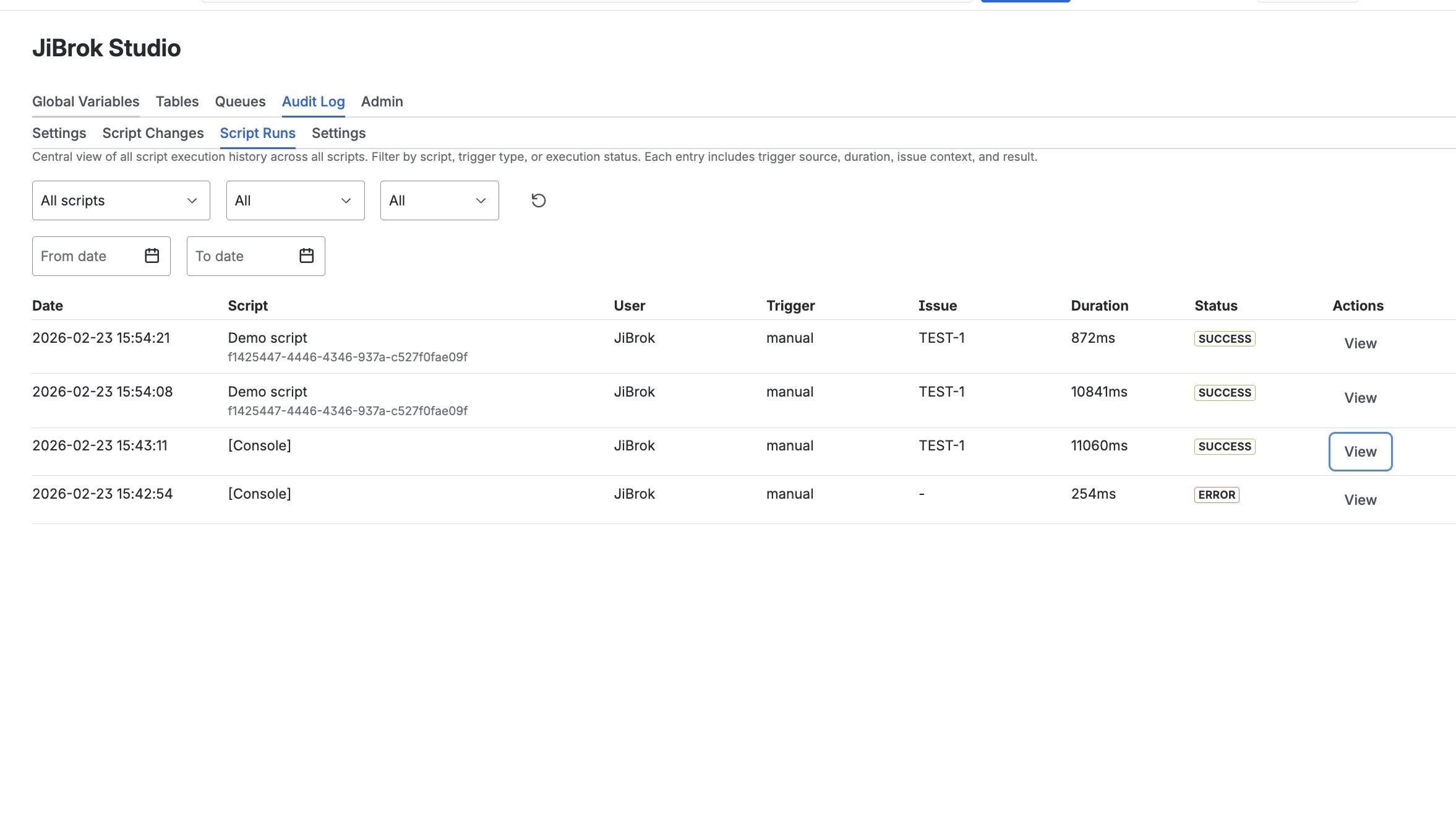
Records are stored in a rolling window - oldest entries are automatically deleted when the limit is reached. See Limits for the specific record count.
Version history audit
Cross-script version history log showing all saved versions across the library.
Filtering options:
- By script ID
- By author (account ID)
Next steps
- Administration - Core settings overview
- Admin Tools - Script usage, import/export, health check
- Limits - All system limits



