 Message Field for Jira Cloud
- Overview
- Delegation Policies
- Setting Up Delegation
- Project Admin UI
- Restrictions
- Permission Checking
- Next Steps
Overview
Delegation allows site administrators to grant project administrators the ability to manage Message Field configurations for their projects.
Administrator Roles
Site Administrators:
- Full access to all configurations
- Configure delegation policies
- Manage global module settings
- View and edit all project configurations
- Set actor (impersonation) for configurations
Project Administrators (when delegation enabled):
- Access project-specific configuration page
- Create/edit/delete configurations for their projects
- Manage custom field configurations for their projects
- Limited by delegation policy
Delegation Policies
Enable for All Projects
Delegation enabled for all projects. All project administrators can manage panels for their projects.
Use when: You trust all project admins and want self-service configuration.
Disable for All Projects
Delegation disabled for all projects. Only site admins can manage panels.
Use when: Strict governance required and centralized control needed.
Enable with Exceptions
Enabled by default, with ability to disable for specific projects.
Use when: Most projects should have access, few projects need restriction.
Disable with Exceptions
Disabled by default, with ability to enable for specific projects.
Use when: You want a controlled rollout or to test the delegation feature.
Setting Up Delegation
For Site Administrators
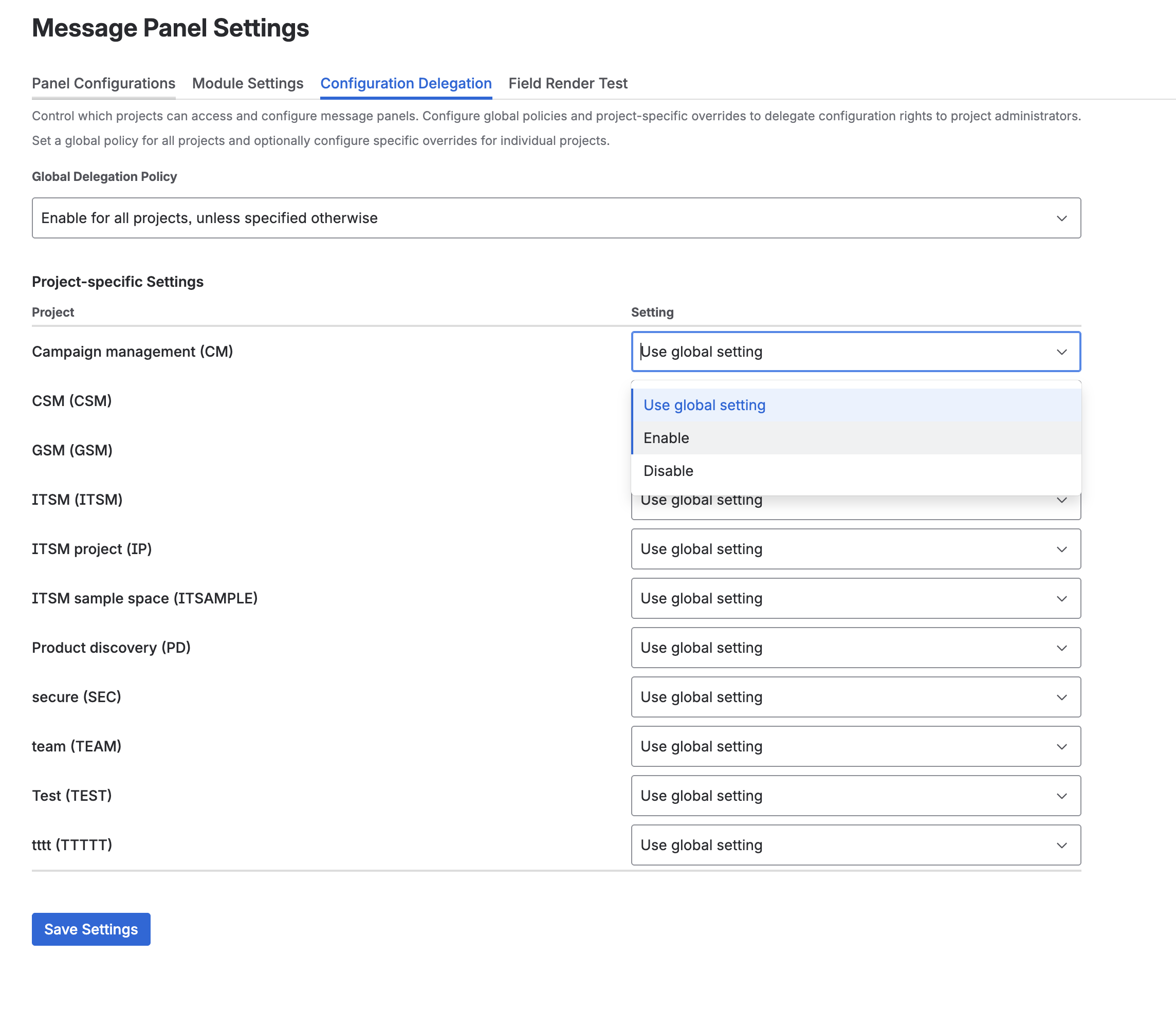
- Go to Apps → Message Field Settings
- Click Configuration Delegation tab
- Select Global Delegation Policy from dropdown:
- Enable for all projects, unless specified otherwise
- Disable for all projects
- (Other policy options)
- Configure Project-specific Settings to override the global policy for individual projects
- Click Save Settings
The delegation settings allow you to control which projects can access and configure message fields. You can:
- Set a global policy for all projects
- Optionally configure specific overrides for individual projects
- Choose between “Use global setting”, “Enable”, or “Disable” for each project
For override policies: Add projects to enable/disable list in the Project-specific Settings table.
For Project Administrators
- Go to Project Settings for your project
- Look for Apps section in sidebar
- Click Message Field Settings
Note: This option only appears if delegation is enabled for your project.
Project Admin UI
When delegation is enabled, project admins see a dedicated settings page within their project settings. This page provides a simplified interface focused on their project’s configurations.
What the Project Settings Page Shows
The project-specific settings page includes:
- Configuration list - all panel configurations targeting the current project
- Create panel button - create new configurations scoped to this project
- Edit/Delete/Duplicate - full management of project configurations
- Custom Fields tab - manage custom field configurations for the project
- Preview - test panels with real issue data
- Export/Import - bulk operations scoped to the project
Walkthrough: Creating a First Panel as Project Admin
- Navigate to your Project Settings → Apps → Message Field Settings
- Click Create panel
- Enter a Name (e.g., “Sprint Planning Reminder”)
- Select a Display Module (e.g., Issue Panel)
- The Project filter is automatically set to your project
- Optionally filter by Issue Type (e.g., Story, Bug)
- Set the Data Source (e.g., Empty for message-only)
- Enter your Message content
- Click Save
- Navigate to an issue in your project to verify the panel appears
Restrictions
Project administrators have the following restrictions compared to site administrators:
What Project Admins Cannot Do
| Restriction | Reason |
|---|---|
| Set actor (impersonation) | Actor configuration affects JQL execution permissions and is a security-sensitive setting |
| Edit global or multi-project configurations | Configurations that target multiple projects or “All Projects” are managed by site admins only |
| Access other projects’ configurations | Each project admin can only see and manage configurations for their own projects |
| Manage global module settings | Enabling/disabling modules globally affects all projects |
| Configure delegation policies | Delegation settings are a site-level administration function |
| See audit metadata | Audit information (who created/modified, timestamps) is available to site admins only |
Configuration Visibility
- Project admins see only configurations that target their project specifically
- Configurations targeting “All Projects” (no project filter) are not visible to project admins
- If a configuration targets multiple projects, it is only visible to and editable by site admins
Permission Checking
Access Control
- Site admins: Full access to all configurations
- Project admins: Only configurations for their projects (if delegation enabled)
Data Access
Project admins can create JQL queries that return issues from any project, but:
- Users still need Jira permissions to see issue data
- Panels respect Jira’s Browse Projects permission
- No elevation of privileges
Next Steps
- Configuration Basics - Create panel configurations
- Permissions & Security - Detailed permissions and security model
- Modules - Display locations
- Templates - Dynamic content
- FAQ - Common delegation questions
- Use Cases - Examples and best practices



